

Chunkizev1.1.0
Pythonby ozorical, niko-at-chalupaChunkize is essentially 'Chunky' but for MCBE-Endstone Servers.
pip install https://github.com/ozorical/Chunkize/releases/download/v1.1.0/endstone_chunkize-1.1.0-py3-none-any.whl- Stars
- 9
PLUGINSCHUNKIZE
# Install
Use the animation for reference. Follow the plugin's README for exact steps.
# README
Chunk pregeneration for Endstone Bedrock servers, made by ozz.
Generate your world ahead of time so players never hit chunk generation lag. Works like Chunky does for Java edition, but built for Bedrock Dedicated Server.
How it works
Bedrock Dedicated Server has no API to load or generate chunks directly. Chunkize works around that by driving the vanilla /tickingarea command. The target region is split into chunk-aligned batches, and each batch gets a temporary ticking area which forces the server to generate those chunks. Chunkize listens for chunk load events to know when a batch has loaded, then holds the area for a settle period so generation can fully finish, and stamps every chunk with a touch-and-restore block write so the server is guaranteed to save it to disk. Only then is the ticking area removed and the next batch started, spiraling outward from the center until the whole region is generated.
Progress is saved to disk, so a server restart or crash picks up right where it left off.
Installation
- Download the latest
.whlfrom the releases page. - Drop it into the
pluginsfolder of your Endstone server. - Restart the server.
Or build it yourself:
pip install build
python -m build
The wheel lands in dist/.
Commands
| Command | Description |
|---|---|
/chunkize start <radius> [dimension] [centerX] [centerZ] [shape] | Start pregenerating. Radius is in blocks. Run as a player and it defaults to your position and dimension, from console it defaults to overworld around 0, 0. Shape is square (default) or circle. |
/chunkize pause | Pause the current task. |
/chunkize resume | Resume a paused task, even after a restart. |
/chunkize cancel | Cancel the task and wipe saved progress. |
/chunkize status | Show progress, speed and ETA. |
/chunkize config | Open the speed mode picker (in game), or /chunkize config <light|medium|intense> from the console. |
Examples:
/chunkize start 5000
/chunkize start 3000 nether
/chunkize start 10000 overworld 0 0 circle
Speed modes
/chunkize config opens a pop up to choose how hard Chunkize works the server. The choice is saved and used for every future generation. Medium is the default until you pick one.
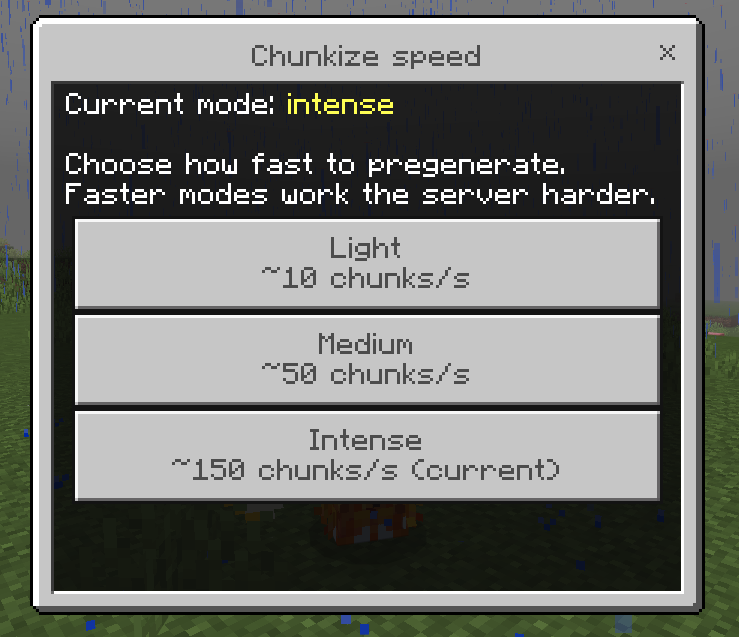
| Mode | Rate | Use it when |
|---|---|---|
| Light | ~10 chunks/s | The server has players on and you want generation barely noticeable. |
| Medium | ~50 chunks/s | Balanced, the default. |
| Intense | ~150 chunks/s | Empty server or strong hardware, generate as fast as the server allows. |
Rates are approximate and depend on your hardware. Each mode sets the underlying generation settings below; you can still override any individual key in config.toml for fine control.
Configuration
plugins/chunkize/config.toml is created on first run. The speed keys are set by the chosen mode, listing them here only for advanced overrides.
| Key | Default | Description |
|---|---|---|
cellChunks | 8 | Side length of each batch in chunks. A batch plus its margin has to fit a ticking area, which caps out at 100 chunks, so this is capped at 10 - 2 x edgeMargin. |
edgeMargin | 1 | Extra chunks loaded around every batch. Bedrock only finalizes a chunk once its neighbours are loaded too, so without a margin the chunks on each batch edge stay unfinished and show up as holes. Leave this at 1. |
minActiveAreas | 1 | Fewest ticking areas to keep running, even when the server is busy. The generator never throttles below this. |
maxActiveAreas | 8 | Most ticking areas to run at once. Chunkize ramps up toward this while the server has headroom and backs off when it doesn't. Bedrock allows 10 per world, leave headroom if your server uses its own. |
targetMspt | 45 | Server load target in milliseconds per tick. The generator adds ticking areas while the server stays under this and sheds them when it goes over. 50 ms is the 20 TPS budget, so a lower value keeps more headroom for players. |
checkIntervalTicks | 5 | How often the generator checks progress and rotates batches. |
cellTimeoutSeconds | 60 | How long to wait on a batch before retrying it, then skipping it. |
settleSeconds | 2 | How long a batch keeps its ticking area after every chunk in it and its margin has loaded, so the server can finish and persist them. Raise it if you still see patchy spots. |
maxRadius | 50000 | Safety cap for the radius argument. |
flushIntervalChunks | 512 | Flush the world save to disk after this many generated chunks, so unsaved chunks cannot pile up in memory. 0 disables the cycle. |
autoResume | true | Continue an interrupted task automatically after a restart. |
logIntervalSeconds | 30 | Progress log interval in the console, 0 to disable. |
saveIntervalSeconds | 30 | How often progress is written to disk. |
CRABSMP mode
Set under [crabsmp] in config.toml. With it on, Chunkize never loads, generates or touches anything within crabsmpRadius blocks of x=0 z=0, no matter what you pass to /chunkize start. Start from 0 0 and it simply begins outside the zone.
| Key | Default | Description |
|---|---|---|
enabled | false | Turn the exclusion zone on. |
crabsmpRadius | 400 | Half-width of the protected square around 0, 0, in blocks. The protected area is rounded outwards to whole chunks. |
The batch margins respect the zone as well, so nothing inside it is loaded even as a neighbour. Chunks right against the zone edge can never be finalized (the neighbours they need are inside the zone), so Chunkize leaves them alone rather than half generating them. They generate normally if a player ever walks there.
Permissions
| Permission | Default | Description |
|---|---|---|
chunkize.command | op | Access to /chunkize. |
Good to know
- Generation speed self-tunes to the server. Chunkize watches milliseconds per tick and runs more ticking areas in parallel while there is headroom, then backs off as load rises, so it goes fast on an idle server and gets out of the way when players are on. Raise
maxActiveAreasfor more top speed on strong hardware, or lowertargetMsptto keep it gentler. - Generated chunks stay in RAM until the server saves them. Chunkize flushes the save on a cycle so the backlog stays bounded, if you still see memory pressure lower
flushIntervalChunksormaxActiveAreas. - The flush uses the vanilla
save hold/save resumecycle. If you run a backup tool that uses the same commands, schedule backups outside generation runs. - The world keeps its ticking area budget while Chunkize runs. If your server already uses several ticking areas, lower
maxActiveAreasso the total stays under 10. Areas left behind by a crash are cleared on startup. - Every batch loads a one chunk margin around itself, because Bedrock will not finalize a chunk until its neighbours are loaded. That is what keeps the edges of each batch from being written half finished.
- Already generated regions are processed much faster than fresh terrain, since loading is cheaper than generating.
- Nether radius is in nether blocks. A 1000 block nether radius covers the same map area as 8000 overworld blocks.
License
MIT, see LICENSE.
Not an official Minecraft product. Not approved by or associated with Mojang or Microsoft.
Not an official Minecraft product. Not approved by or associated with Mojang or Microsoft.